SCSS to CSS Converter – Compile SCSS to CSS Online
Use Calcon on Android
Get quick access to useful Calcon tools on your phone.
Calcon's free SCSS to CSS Converter compiles your Sass code down to clean, browser-ready CSS right in your browser — no signup, no upload, nothing sent to a server. Paste your SCSS, pick expanded or minified output, and the tool resolves every $variable, flattens your nesting, and expands your mixins and loops into standard CSS instantly. It's the fastest way to compile SCSS to CSS online.
What Is SCSS to CSS Conversion?
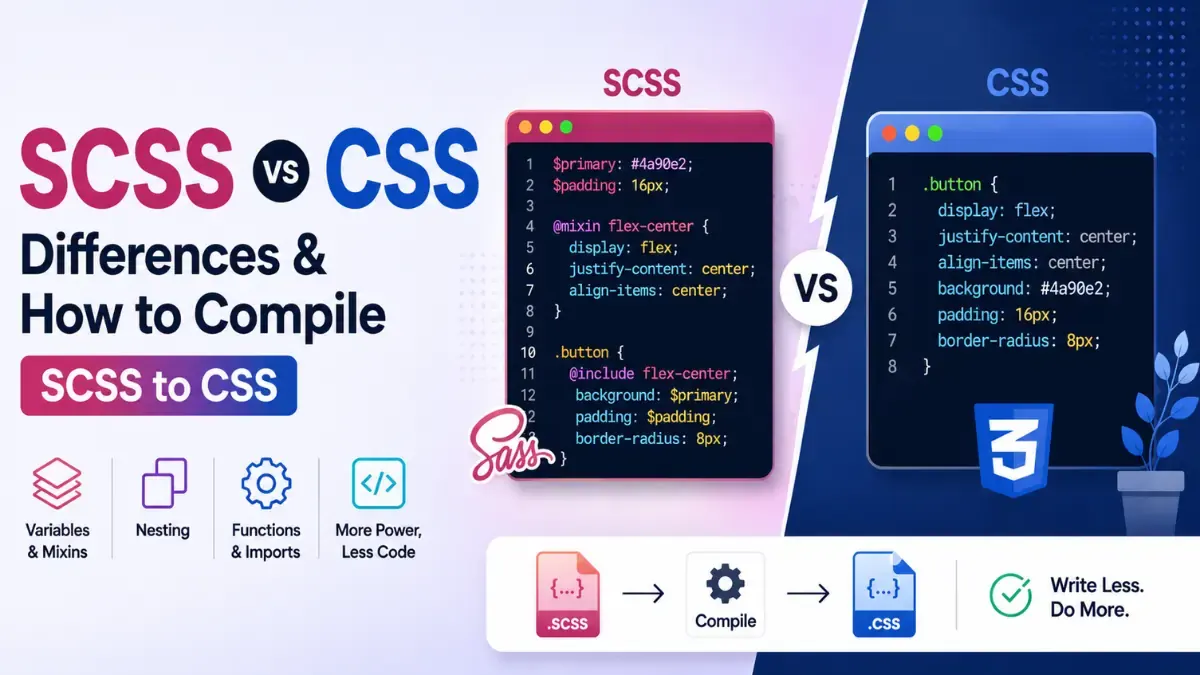
SCSS (Sassy CSS) is a preprocessor — a richer syntax that adds variables, nesting, mixins, functions, and loops on top of CSS. The catch is that browsers can't read SCSS: they only understand plain CSS. Before your styles can render, the SCSS has to be compiled into CSS. That's what this converter does. It runs the official Sass compiler over your code and hands back the equivalent CSS — the same output your build tools would generate, produced instantly in your browser.
How to Convert SCSS to CSS
- Paste your SCSS into the input box, or upload a
.scssfile. - Choose your output style — Expanded for readable CSS or Compressed for minified production CSS.
- The CSS compiles live as you type. Copy it, or download it as a
.cssfile.
What Gets Compiled
Because this tool uses the real dart-sass engine, the full Sass language compiles correctly:
$variablesresolved. Every variable reference is replaced with its computed value in the final CSS.- Nested selectors flattened. SCSS nesting and the
&parent selector are expanded into the flat selectors browsers expect. - Mixins, functions & loops expanded.
@mixin/@include,@function,@each,@for, and@ifare evaluated and written out as plain CSS rules. - Partials & math inlined. Interpolation
#{…}and arithmetic are computed, producing complete, ready-to-ship CSS.
Expanded vs Compressed Output
Expanded output is formatted for humans — one declaration per line with indentation — which is best while you're reading, debugging, or committing CSS to source control. Compressed output is minified: whitespace and comments are stripped to produce the smallest possible file, which is what you want to ship to production. Both come from the same SCSS; only the formatting changes. Need the reverse direction? Use the CSS to SCSS Converter. To tidy up plain CSS, try the CSS Formatter or shrink it further with the CSS Minifier.
Frequently Asked Questions
What does an SCSS to CSS converter do?
It compiles SCSS (Sass) preprocessor code into standard CSS that browsers can read. SCSS adds developer conveniences — variables, nesting, mixins, functions, and loops — that aren't valid CSS on their own. The converter runs the Sass compiler over your code and produces the equivalent flat CSS, with every $variable resolved, every nested selector flattened, and every mixin expanded.
Why can't browsers use SCSS directly?
Browsers only understand plain CSS. SCSS is a preprocessor language: features like $variables, & parent selectors, @mixin, @function, @each and @if have no meaning to a browser. Before your styles can be applied, the SCSS has to be compiled down to CSS — which is exactly what this tool does, instantly and in your browser.
Does it support variables, nesting, and mixins?
Yes — it uses the official dart-sass compiler, so the full Sass language is supported. $variables are resolved to their values, nested selectors are flattened to real CSS selectors, and @mixin, @include, @function, @each, @for, and @if are all expanded. Interpolation (#{...}) and math operations are evaluated too, so the output is complete, browser-ready CSS.
What's the difference between expanded and compressed output?
Expanded output is human-readable: one declaration per line with proper indentation, ideal for reading, debugging, or committing to source. Compressed output is minified — whitespace and comments stripped, everything on as few lines as possible — which produces the smallest file for production. Both compile from the same SCSS; only the formatting differs.
Is it free and private?
Completely free, with no signup. Compilation happens entirely in your browser using a Sass engine loaded on demand — your SCSS is never uploaded to any server. Once the compiler has loaded, the conversion is pure local computation, so your code stays on your device.
Why am I getting a compile error?
A compile error means the SCSS has invalid syntax — a missing semicolon or brace, an undefined $variable, a bad @include, or an unterminated block. The tool catches the compiler's message and shows it (including the line number) in a red box so you can jump straight to the problem and fix it. Valid Sass always compiles cleanly.
Related Blog Posts
Related Developer Tools
Base64 Encoder / Decoder
Encode and decode Base64 instantly.
Bcrypt Hash Generator
Generate and verify bcrypt hashes in your browser.
Border Radius Generator
Generate CSS border-radius visually with live preview.
Box Shadow Generator
Generate CSS box shadows visually with live preview.
Color Palette Generator
Create harmonious color palettes from any color.
Color Picker
Pick colors and get HEX, RGB, HSL, CMYK instantly.
CSS Formatter / Beautifier
Format and beautify CSS code instantly.
CSS Gradient Generator
Generate linear, radial, and conic CSS gradients visually.
CSS Minifier
Minify CSS code instantly in browser.
CSS to SCSS Converter
Convert flat CSS to idiomatic nested SCSS instantly.
Get new tools & guides
Occasional updates, no spam.