
SCSS vs CSS: What's the Difference & How to Compile SCSS to CSS
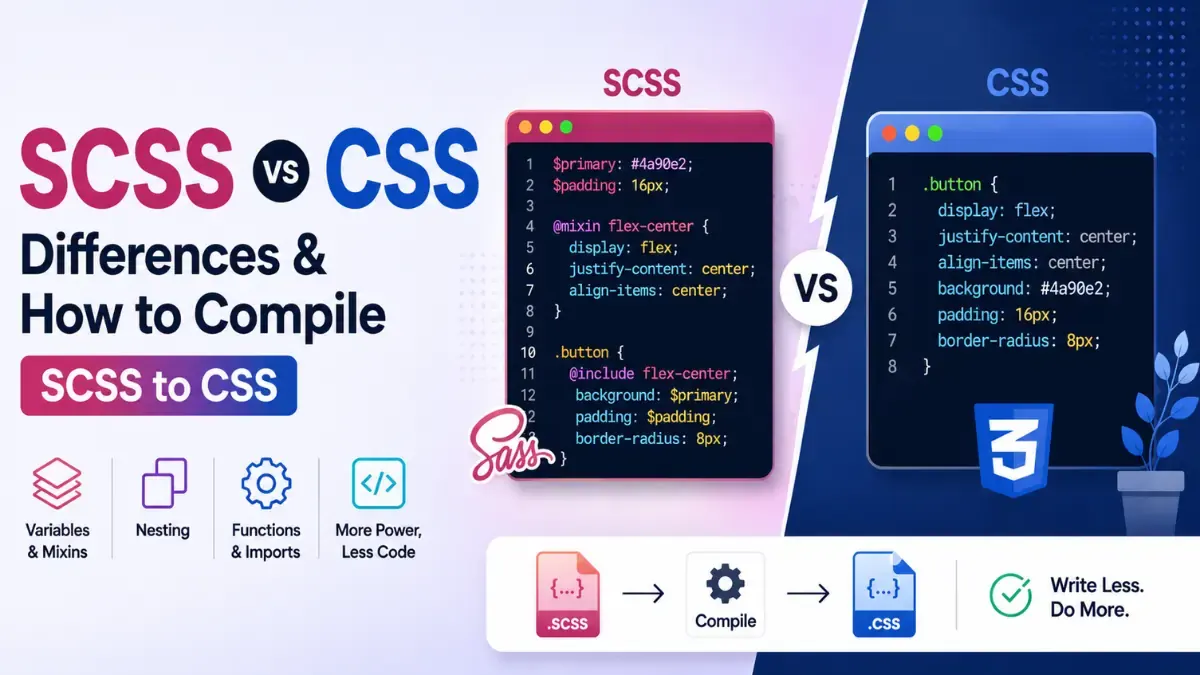
If you've opened a modern frontend project, you've probably seen .scss files sitting where you expected plain CSS - and wondered what the difference actually is. The short version: SCSS is a more powerful way to write CSS, but browsers can't read it. Everything you write in SCSS must be compiled into standard CSS before a website can use it.
This guide explains what SCSS adds, shows exactly what changes at compile time with a real before/after example, and covers the ways to convert it - including the free Calcon SCSS to CSS Converter that compiles in your browser.
What Is CSS?
CSS (Cascading Style Sheets) is the language browsers actually understand for styling web pages - colors, layout, fonts, spacing. It is deliberately simple: selectors and declarations, nothing more. That simplicity is also its weakness on large projects: the same color pasted in fifty places, deeply repeated selector paths, and no way to reuse a block of styles.
What Is SCSS?
SCSS (“Sassy CSS”) is the most popular syntax of Sass, a CSS preprocessor. It is a superset of CSS - every valid CSS file is already valid SCSS - that adds programming conveniences: variables, nesting, mixins, functions, and file partials. You write smarter, shorter source code, and a compiler turns it into ordinary CSS for the browser.
That last part is the key fact people miss: browsers cannot read SCSS at all. Ship an .scss file to a browser and nothing happens. Compilation isn't optional - it's the whole workflow.
SCSS vs CSS at a Glance
CSS | SCSS | |
|---|---|---|
Browser support | Read natively by every browser | Not readable — must be compiled to CSS first |
Variables | CSS custom properties (--var), runtime | $variables, resolved at compile time |
Nesting | Limited native nesting (newer browsers) | Full nesting with & parent selector, flattened on compile |
Reuse | No mixins or functions | Mixins, functions, @each/@if loops and logic |
File structure | One file or plain @import requests | Partials (_file.scss) merged into one CSS file at compile |
Best for | Small projects, final output | Large codebases, design systems, themes |
What Actually Changes at Compile Time
The clearest way to understand the conversion is to see it. Here's a small SCSS source:
$brand: #0f766e;
$radius: 8px;

 .card {
  border-radius: $radius;
  .title { color: $brand; }
  &:hover { box-shadow: 0 2px 8px rgba(0,0,0,.1); }
}
And the CSS it compiles to:
.card {
  border-radius: 8px;
}

.card .title {
  color: #0f766e;
}

.card:hover {
  box-shadow: 0 2px 8px rgba(0,0,0,.1);
}
Three things happened: the $variables were replaced with their literal values, the nesting was flattened into full selector paths, and the & parent selector became .card:hover. Mixins, functions and loops expand the same way - the output is always plain CSS with no Sass features left in it.
How to Compile SCSS to CSS
Option 1 - Online (fastest, no setup)
Open the converter: calcon.in/scss-to-css.
Paste your SCSS (or upload a .scss file).
Choose Expanded (readable) or Compressed (minified) output.
Copy or download the compiled CSS - it compiles live as you type, entirely in your browser.
Perfect for quick conversions, checking what a snippet compiles to, learning Sass, or converting a file when you don't have a build setup handy.
Use Calcon on Android
Take useful Calcon tools with you wherever you go.
Option 2 - The Sass CLI (for projects)
Install the official compiler with npm install -g sass, then run sass input.scss output.css. Add --watch to recompile automatically on every save, and --style=compressed for minified production output.
Option 3 - Build tools (automatic)
In real projects, the bundler compiles SCSS for you: Vite, webpack (sass-loader), and most frameworks handle .scss files automatically once the sass package is installed. You write SCSS; the build ships CSS.
Expanded vs Compressed Output
Expanded - human-readable, properly indented. Use while developing or when you'll hand-edit the result.
Compressed - whitespace stripped, one line. Use for production, where smaller files load faster. (It's the same as running the result through a CSS minifier.)
Common SCSS Compile Errors
Undefined variable - you used $name before declaring it, or the partial that defines it isn't imported.
Expected “}” / unclosed block - a missing brace, usually from deep nesting. The compiler reports the line number.
Invalid CSS after … - a typo like a missing semicolon or colon; check the exact line in the error.
A good converter shows you the compiler's real error message and line number instead of failing silently — fix the line it names and recompile.
Frequently Asked Questions
Is SCSS better than CSS?
SCSS is better for writing and maintaining styles on larger projects; CSS is what actually runs in the browser. They're not competitors — SCSS compiles into CSS.
Can browsers read SCSS files?
No. Browsers only understand CSS. SCSS must be compiled to CSS before a website can use it — that's exactly what an SCSS to CSS converter does.
Does compiling change how my styles look?
No. Compilation resolves variables, flattens nesting, and expands mixins, but the visual result in the browser is identical to what your SCSS describes.
What's the difference between Sass and SCSS?
Sass is the preprocessor; SCSS is its modern, CSS-like syntax (braces and semicolons). The older indented “Sass” syntax uses indentation instead. SCSS is what almost everyone writes today.
Can I convert CSS back to SCSS?
Yes - the reverse direction adds structure (nesting, variables) to flat CSS. Calcon has a separate CSS to SCSS converter for that.
Is the online converter private?
Yes. The Calcon converter compiles entirely in your browser - your code is never uploaded to a server.
The Bottom Line
SCSS is how you write styles; CSS is what the browser runs. Every SCSS workflow ends in a compile step - variables resolved, nesting flattened, mixins expanded. For projects, let your build tool do it; for everything else, compile instantly with the free Calcon SCSS to CSS Converter - and if you're going the other way, the CSS to SCSS Converter adds the structure back. For production, finish with the CSS Minifier.
Get Calcon on Android. Quickly access useful tools whenever you need them.
Related Tools
Get new tools & guides
Occasional updates, no spam.
Latest Posts
PPF vs SIP: Where Should You Put Your Money?

PPF vs Mutual Fund SIP: Which is Better for Long-Term Wealth Creation?
How to Resize Photo & Signature for Online Exam Forms (Size + KB Guide)
How to Resize Image Dimensions Online (Width, Height & Aspect Ratio)
How to Remove a Password from a PDF (Unlock PDF Free)